Reading and Remediating Wazuh SCA Findings on macOS
1. Anatomy of an SCA Finding
Location: Endpoint Security → Configuration Assessment
| Field | Description |
|---|---|
| ID / Title | Identifier for the setting under test |
| Command | Script Wazuh executes on the endpoint to read the current state |
| Rationale | Security justification for the check |
| Description | Additional context, including OS-version caveats |
| Remediation | Fix instructions: Terminal command or configuration profile |
| Check (Condition) | Regex the command output must match to pass |
| Compliance | Mapped frameworks (CIS, NIST 800-53, CMMC, ISO 27001, PCI-DSS, HIPAA, etc.) |
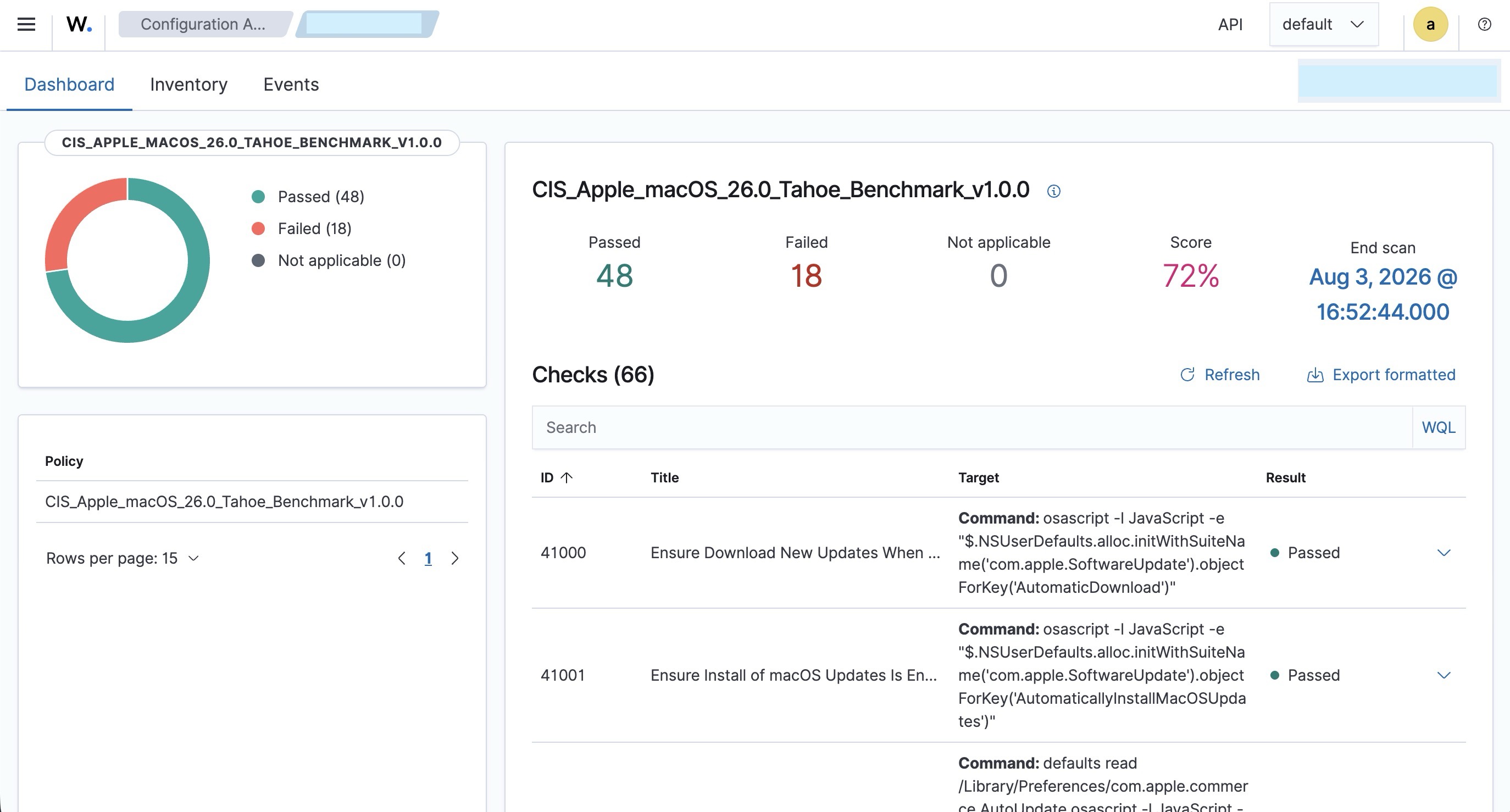
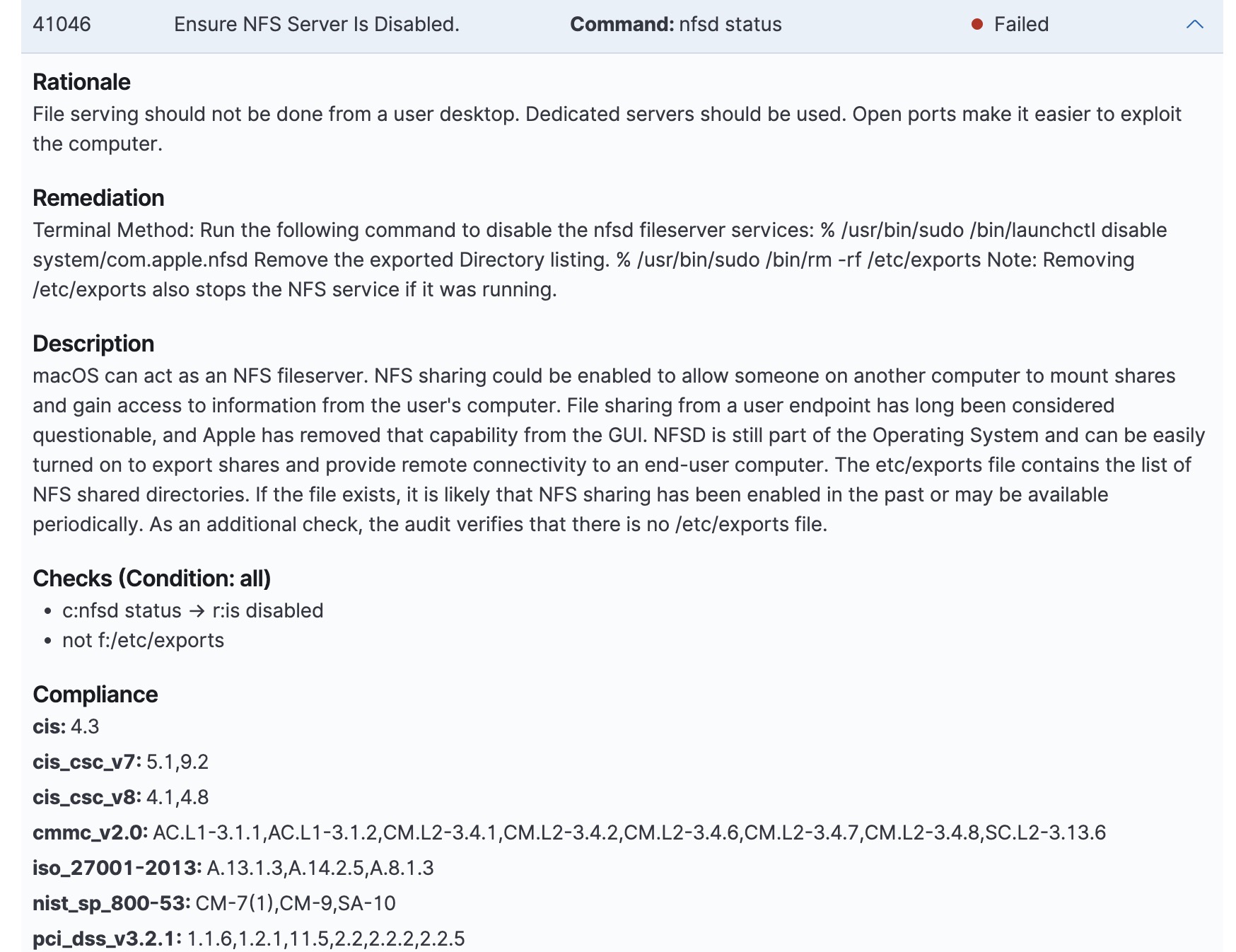
A single check can map to multiple compliance frameworks simultaneously.
2. Parsing CIS Remediation Text
2.1 The % symbol
Represents a terminal prompt. Never part of the actual command.
2.2 Applicability tags
Remediation text is frequently followed by a scope/category label with no delimiter (e.g. Internal Only, External, General, Enterprise, macOS Only). These are not part of the command syntax.
2.3 Parsing rules
| Rule | Detail |
|---|---|
| Command ends in a quoted string | Ends at the closing quote |
| Command ends in a bare word/number | Check whether the following text is a category label; if so, it's a tag, not a command argument |
| Redundant full paths | Drop them (/usr/bin/sudo → sudo, /bin/launchctl → launchctl); binaries are already on $PATH |
Multiple % in one remediation block |
Multiple separate commands; each needs its own sudo; do not concatenate into one line |
3. Remediation Methods
| Method | Mechanism |
|---|---|
| Terminal Method | Direct shell command |
| Profile Method | Configuration profile (.mobileconfig) setting a value under a specific PayloadType and key, installed via System Settings → Profiles |
Use the Profile Method when the setting lives inside an NSUserDefaults domain not exposed through any GUI toggle.
4. Terminal Method: Procedure
- Parse the remediation text per Section 2.
- Identify each discrete command (one per
%). - Run each command with
sudoindividually. - Confirm no command is destructive to data you need before executing (
rm, overwrite operations, etc.). - Proceed to Section 7 (Verification).
5. Profile Method: Procedure
5.1 Identify the payload parameters
From the remediation text, extract:
| Parameter | Source |
|---|---|
PayloadType |
Stated directly in the remediation text |
| Key | Stated directly in the remediation text |
| Required value | Stated directly in the remediation text |
5.2 Build the profile
<?xml version="1.0" encoding="UTF-8"?>
<!DOCTYPE plist PUBLIC "-//Apple//DTD PLIST 1.0//EN" "http://www.apple.com/DTDs/PropertyList-1.0.dtd">
<plist version="1.0">
<dict>
    <key>PayloadContent</key>
    <array>
        <dict>
            <key>PayloadType</key>
            <string>{payload-type}</string>
            <key>PayloadIdentifier</key>
            <string>{reverse-dns-identifier}</string>
            <key>PayloadUUID</key>
            <string>{generate-with-uuidgen}</string>
            <key>PayloadEnabled</key>
            <true/>
            <key>PayloadDisplayName</key>
            <string>{display-name}</string>
            <key>{setting-key}</key>
            <!-- value type depends on the setting: <true/>, <false/>, <integer>N</integer>, <string>...</string> -->
        </dict>
    </array>
    <key>PayloadDisplayName</key>
    <string>{profile-display-name}</string>
    <key>PayloadIdentifier</key>
    <string>{reverse-dns-identifier}</string>
    <key>PayloadUUID</key>
    <string>{generate-with-uuidgen}</string>
    <key>PayloadType</key>
    <string>Configuration</string>
    <key>PayloadVersion</key>
    <integer>1</integer>
    <key>PayloadScope</key>
    <string>System</string>
</dict>
</plist>
5.3 Installation steps
- Generate two UUIDs:
- Replace both
{generate-with-uuidgen}placeholders with the generated values. - Save the file with a
.mobileconfigextension. - Double-click the file. This opens System Settings → Profiles.
- Select the profile, click Install, and authenticate.
- Proceed to Section 7 (Verification).
6. Deprecated Controls
Some checks target subsystems Apple has deprecated or restricted at the OS level.
Indicators:
- The remediation command fails with an OS-level error (e.g. Input/output error) rather than a syntax or permissions error.
- The check's own Description field states the underlying feature is deprecated.
- Both legacy and modern command syntax (e.g. launchctl load and launchctl bootstrap) produce the identical failure.
Handling: 1. Do not repeatedly retry alternate syntaxes once the same underlying error is confirmed. 2. Document the check as a known exception, including the exact error output. 3. Check the Description field for a vendor-recommended alternative control. 4. If no alternative exists, record the check as accepted risk or out of scope for this OS version.
7. Verification Procedure
Apply after any remediation (Terminal or Profile method):
- Re-run the exact check command from the finding detail in Terminal to confirm the value changed.
- Force a fresh SCA scan:
- Reload the Wazuh dashboard and confirm the check ID moved from Failed to Passed.
8. Automating Remediation
The Wazuh SCA module detects and reports only; it does not remediate automatically.
- Write a remediation script containing the desired fix commands.
- Deploy the script via Wazuh's Command / Active Response module.
- Configure the script to run on a schedule and/or on agent restart.
- Wazuh triggers a re-scan and updates compliance status.
Which checks to remediate remains an operator decision; the script executes only what it is written to execute.
9. Scaling to a Fleet: MDM
Manual remediation applies per endpoint. In a managed environment, the same .mobileconfig payloads are uploaded once into an MDM (Jamf, Kandji, Mosyle, or Apple Business Manager plus a compatible MDM) and pushed automatically to all enrolled devices, with compliance re-checked continuously. Profile content is identical between manual and MDM deployment; only the distribution mechanism changes.
10. Resources and Repositories
| Resource | Type | Use |
|---|---|---|
| usnistgov/macos_security | GitHub repository | Generates ready-to-use .mobileconfig profiles, remediation scripts, and audit checks for CIS, NIST 800-53, and DISA STIG baselines. |
| wazuh/wazuh | GitHub repository | Core Wazuh platform source. |
| wazuh/wazuh-documentation | GitHub repository | Official Wazuh documentation source, including SCA and proof-of-concept guides. |
| ADORSYS-GIS/wazuh-yara | GitHub repository | YARA integration installer for Wazuh malware detection on Linux, macOS, and Windows. |
| CIS Benchmarks | Reference documents | Authoritative source for benchmark remediation text used by Wazuh's SCA module. |
| Apple Device Management documentation | Reference documentation | Canonical list of every PayloadType and key supported by Apple. |
| Wazuh SCA documentation | Official documentation | SCA module reference: policy structure, check syntax, condition types. |